все гайды
Знаете, как сделать такой stepper? Если нет, то новый туториал для вас
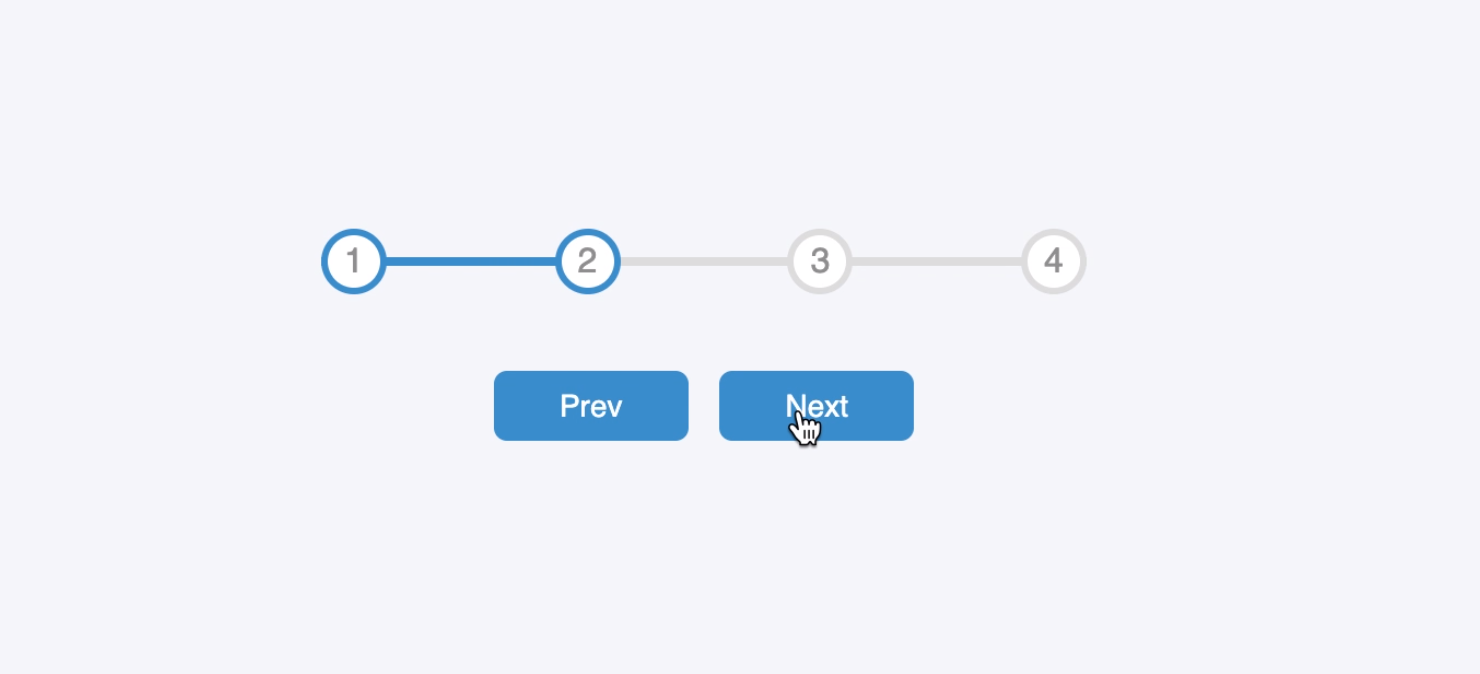
Задача
В этом уроке рассмотрим создание такого полезного компонента как степпер. Помогает упорядточить последовательность действий для пользователя с минимальным использованием места на странице веб приложения. В данном уроке используется не только css и html, но так же включен javascript для обработки кнопок.
HTML
<!DOCTYPE HTML PUBLIC>
<html lang="RU">
<head>
    <meta http-equiv="Content-Type" content="text/html; charset=utf-8">
    <link rel="stylesheet" href="index.css">
    <title>Justice Cards</title>
</head>
<body>
<div class="container">
    <div class="progress-container">
        <div class="progress" id="progress"></div>
        <div class="circle active">1</div>
        <div class="circle">2</div>
        <div class="circle">3</div>
        <div class="circle">4</div>
    </div>
    <button class="btn" id="prev" disabled>Prev</button>
    <button class="btn" id="next">Next</button>
</div>
</body>
<script src="index.js"></script>
</html>
JS
const progress = document.getElementById("progress");
const prev = document.getElementById("prev");
const next = document.getElementById("next");
const circles = document.querySelectorAll(".circle");

let currentActive = 1;

next.addEventListener("click", () => {
	currentActive++;
	if (currentActive > circles.length) currentActive = circles.length;
	update();
});

prev.addEventListener("click", () => {
	currentActive--;
	if (currentActive < 1) currentActive = 1;
	update();
});

const update = () => {
	circles.forEach((circle, index) => {
		if (index < currentActive) circle.classList.add("active");
		else circle.classList.remove("active");
	});
	const actives = document.querySelectorAll(".active");
	progress.style.width =
		((actives.length - 1) / (circles.length - 1)) * 100 + "%";
	if (currentActive === 1) prev.disabled = true;
	else if (currentActive === circles.length) next.disabled = true;
	else {
		prev.disabled = false;
		next.disabled = false;
	}
};
CSS
:root {
    --line-border-fill: #3498db;
    --line-border-empty: #e0e0e0;
}

* {
    box-sizing: border-box;
}

body {
    font-family: "Muli", sans-serif;
    background-color: #f6f7fb;
    display: flex;
    align-items: center;
    justify-content: center;
    height: 100vh;
    overflow: hidden;
    margin: 0;
}

.container {
    text-align: center;
}

.progress-container {
    display: flex;
    justify-content: space-between;
    position: relative;
    margin-bottom: 30px;
    max-width: 100%;
    width: 350px;
}

.progress-container::before {
    content: ""; /* Mandatory with ::before */
    background-color: var(--line-border-empty);
    position: absolute;
    top: 50%;
    left: 0;
    transform: translateY(-50%);
    height: 4px;
    width: 100%;
    z-index: -1;
}

.progress {
    background-color: var(--line-border-fill);
    position: absolute;
    top: 50%;
    left: 0;
    transform: translateY(-50%);
    height: 4px;
    width: 0%;
    z-index: -1;
    transition: 0.4s ease;
}

.circle {
    background-color: #fff;
    color: #999;
    border-radius: 50%;
    height: 30px;
    width: 30px;
    display: flex;
    align-items: center;
    justify-content: center;
    border: 3px solid var(--line-border-empty);
    transition: 0.4s ease;
}

.circle.active {
    border-color: var(--line-border-fill);
}

.btn {
    background-color: var(--line-border-fill);
    color: #fff;
    border: 0;
    border-radius: 6px;
    cursor: pointer;
    font-family: inherit;
    padding: 8px 30px;
    margin: 5px;
    font-size: 14px;
}

.btn:active {
    transform: scale(0.98);
}

.btn:focus {
    outline: 0;
}

.btn:disabled {
    background-color: var(--line-border-empty);
    cursor: not-allowed;
}